Video Tutorials
Download User Guide PDF
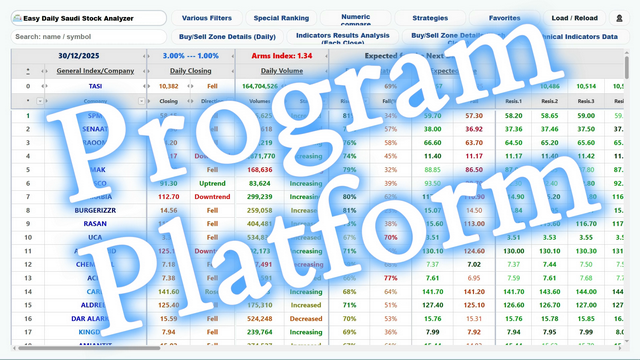
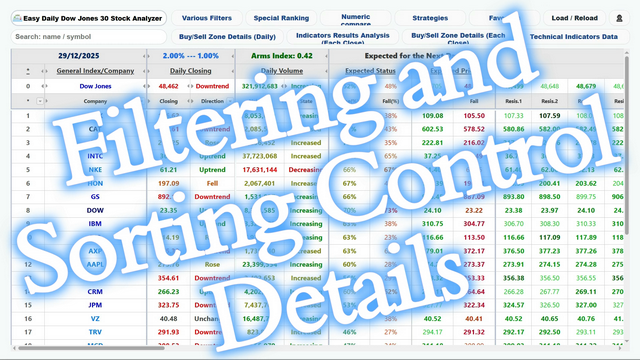
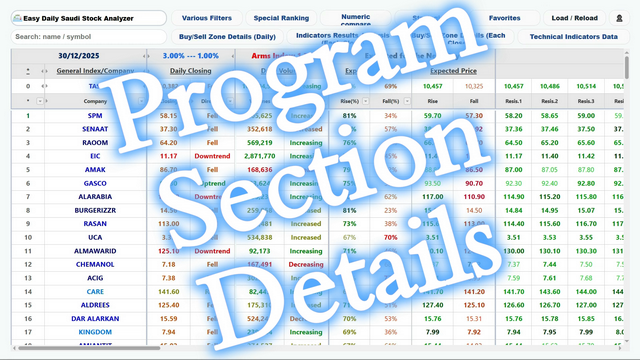
The program consists of more than 600 columns covering all possible data for all stocks/currency pairs. Each stock/currency pair has more than 150 service cells and more than 450 visible/toggleable cells containing the digital data needed for the next trading day. For easier and faster use of this data, the program content is divided into five visible/toggleable sections with professional control buttons for quick access, as follows:
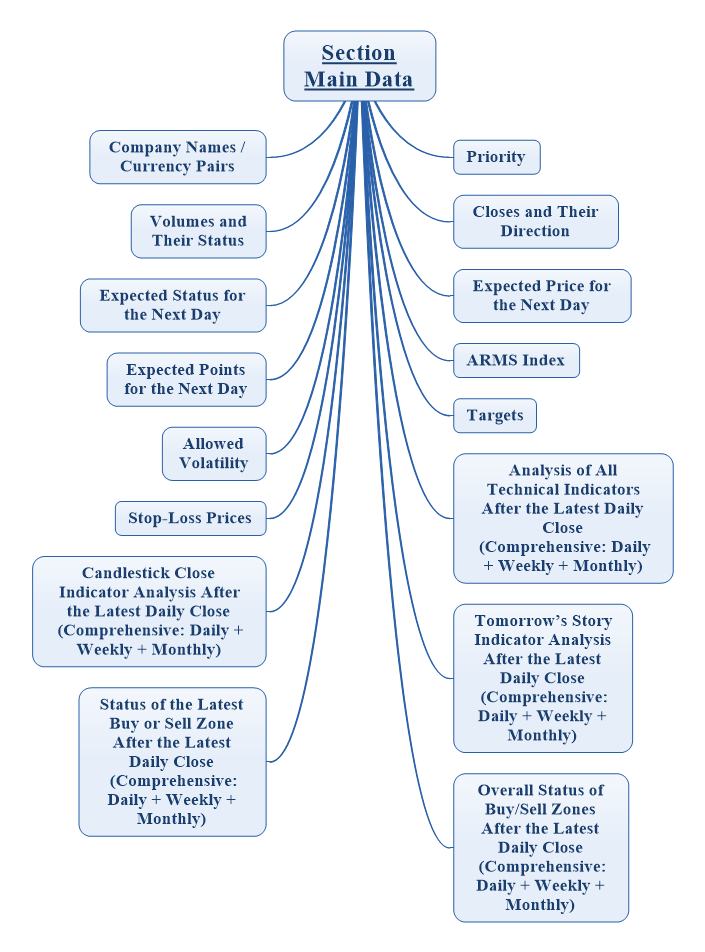
(1) Main Data Section
The Main Data section contains everything a trader needs for the next trading day. It shows stocks/currency pairs ranked according to their technical preference, together with their expected states for the next trading day as professionally inferred by the program’s numerical engine. This includes the overall results of technical analysis for the daily, weekly, and monthly periods, the expected prices, and the targets (price supports and resistances merged with correction/Fibonacci levels). It also shows the technical indicators analysis result, Tomorrow’s Story indicator, and Candle-Close indicator for the daily, weekly, and monthly periods after the last daily close. This section also includes the general Buy/Sell Zones status and the status of the last zone for the daily, weekly, and monthly periods after the last daily close. This section appears permanently when entering the program.
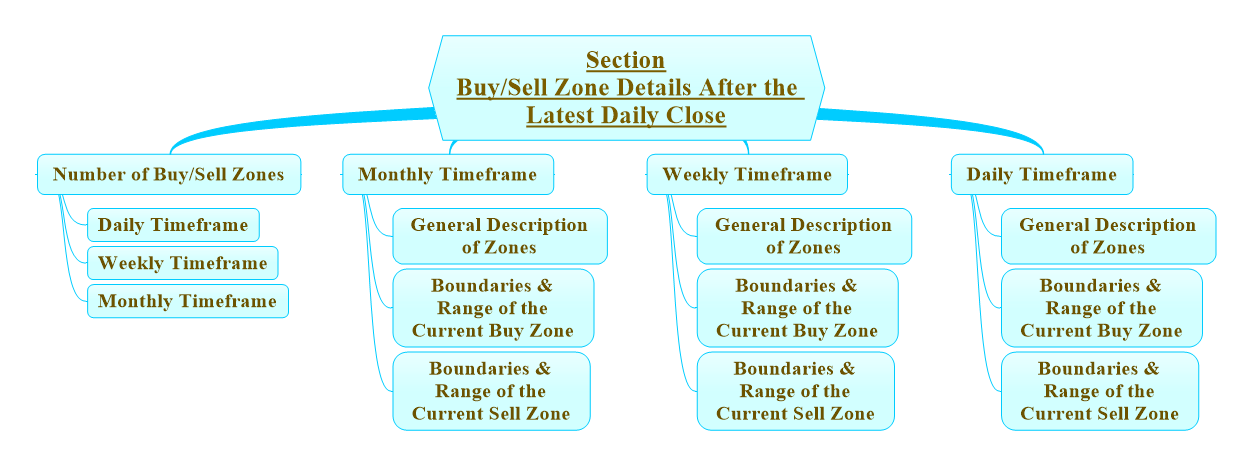
(2) Buy/Sell Zones Details after the Last Daily Close
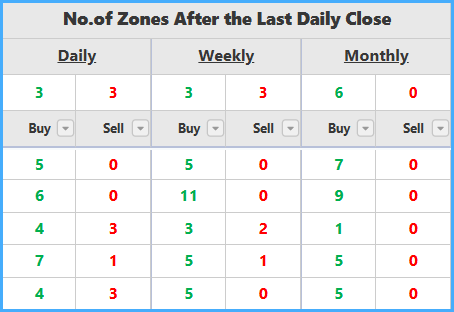
This section shows special details for Buy and Sell zones, including the general description, boundaries, and magnitude of the current zones for the daily, weekly, and monthly periods after the last daily close. It also includes the total number of Buy and Sell zones for the daily, weekly, and monthly periods after the last daily close, covering the last 200 periods. This section appears/disappears by pressing the “Buy/Sell Zones Details (Today)” button.
(3) Technical Indicators Analysis Results and Buy/Sell Zones after Each Period Close
This section shows the technical indicators analysis result, Tomorrow’s Story indicator, and Candle-Close indicator for the daily period after the last day close, for the weekly period after the last week close, and for the monthly period after the last month close. It also includes the general Buy/Sell Zones status and the status of the last zone for the daily period after the last day close, the weekly period after the last week close, and the monthly period after the last month close. This section appears/disappears by pressing the “Indicators Analysis Results (by Periods)” button.

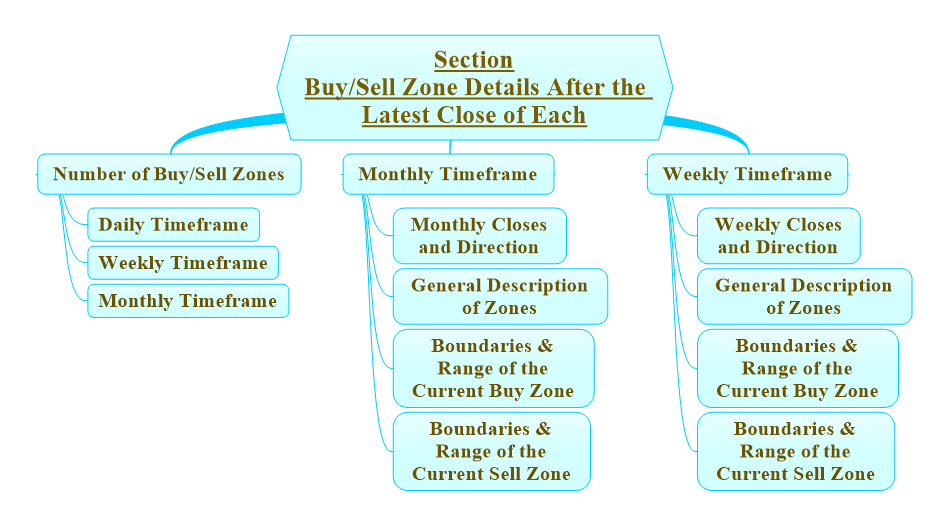
(4) Buy/Sell Zones Details after Each Period Close
This section shows special details for Buy and Sell zones, including the general description, boundaries, and magnitude of the current zones for the weekly period after the last week close and for the monthly period after the last month close. It also includes the weekly and monthly closes and their states, and the total number of Buy and Sell zones for the daily period after the last day close, the weekly period after the last week close, and the monthly period after the last month close, covering the last 200 periods. This section appears/disappears by pressing the “Zones Details (Week/Month)” button.
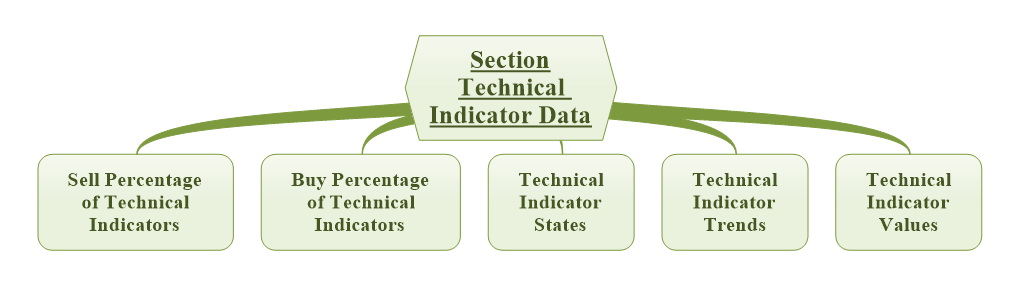
(5) Technical Indicators Data
This section shows all values, directions, states, and buy/sell percentages for all technical indicators in the program (more than 40 different technical indicators), for all stocks/currency pairs and for the general index. This data is shown for the daily period only. This section appears/disappears by pressing the “Indicators Data” button.
Program Buttons & Icons
Program Contents Details
Details of the Main Data Section
Last Update Date
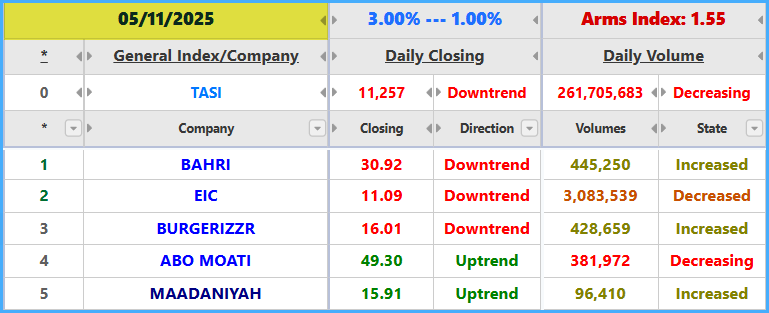
For stock markets, program data is updated after the end of trading by at least five hours. During this time, historical computer studies, checks, and digital readings are performed for all periods after adding the new day’s trading data. For the Forex version, the update is performed at 00:00 GMT at the end of each trading day. The update time may increase or decrease slightly depending on the number of companies in each market and the availability of daily trading data, especially if a data correction exists.
Lower and Upper Percentages for Rise and Drop
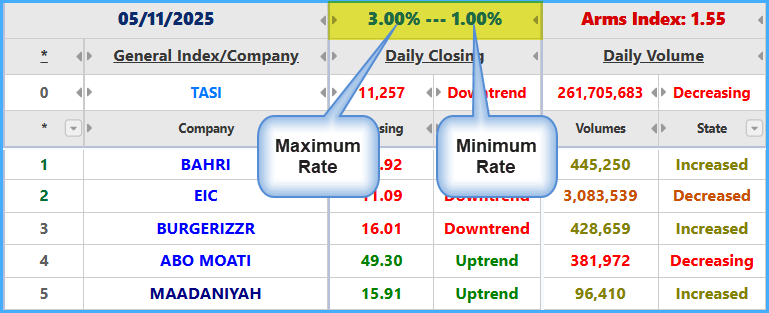
These percentages are a volatility gauge for all stocks/currency pairs, both upward and downward. The program assigns and changes them automatically based on the market direction and state, and the numerical technical analysis results are calculated based on them.
They include the lower percentage, which represents the lowest possible volatility measure for all stocks/currency pairs, and the upper percentage, which represents the highest possible volatility measure for all stocks/currency pairs. Their calculation depends on the average price volatility of all stocks/currency pairs, and they differ from one period to another and from one market to another. The colors of stock/currency-pair names depend on these percentages.
General Index and Company/Currency Pair Name
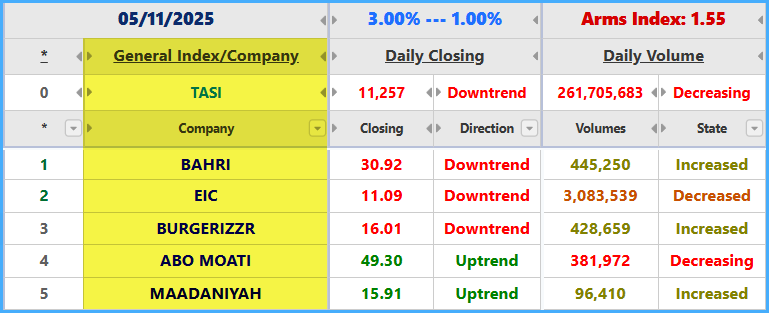
The color becomes darker as the expected upward price percentage becomes larger.
Light Blue: the expected rise percentage for the next day is less than or equal to the “lower percentage”.
Blue: the expected rise percentage for the next day is greater than the “lower percentage” and less than the “upper percentage”.
Dark Blue: the expected rise percentage for the next day is greater than the “upper percentage” and less than twice the “upper percentage”.
Black: the expected rise percentage for the next day is greater than or equal to twice the “upper percentage”.
* The General Index row does not exist in Forex versions of the program.
Quick Analysis Card

The Quick Analysis Card is a compact window that appears when clicking on a company name, currency pair, or general market index. It displays the key technical analysis results, expected price data, targets, support and resistance levels, along with a simplified candlestick and volume chart for the last 5 trading days. This card helps users visually compare companies or currency pairs after applying filters, sorting, or strategies. It includes the following:
- Displays the key daily, weekly, and monthly technical analysis results.
- Displays the expected upward and downward percentages and prices.
- Displays support and resistance levels, as well as the stop-loss level.
- Displays a simplified candlestick and volume chart for the last 5 trading days.
- Supports comparison between multiple companies by opening several cards.
- Works according to the selected market and language.
- The last Sell zone was broken, and there are no Buy zones.
- The last Sell zone was broken, a previous Sell zone exists, and there are no Buy zones.
- New continuation Sell zone, and there are no Buy zones.
- New Sell zone, and there are no Buy zones.
- Previous Sell zone, and there are no Buy zones.
- Ongoing Sell zone, and there are no Buy zones.
- The last Buy zone was broken, and there are no Sell zones.
- New continuation Sell zone with a break of the last Buy zone.
- New Sell zone with a break of the last Buy zone.
- The last Buy zone was broken, and a previous Sell zone exists.
- The last Buy zone was broken, and an ongoing Sell zone exists.
- The last Buy zone was broken, a previous Buy zone exists, and there are no Sell zones.
- New continuation Sell zone with a break of the last Buy zone and a previous Buy zone exists.
- New Sell zone with a break of the last Buy zone and a previous Buy zone exists.
- The last Buy zone was broken, and a previous Buy zone and an ongoing Sell zone exist.
- New continuation Buy zone, and there are no Sell zones.
- New continuation Buy zone with a break of the last Sell zone.
- New continuation Buy zone with a break of the last Sell zone and a previous Sell zone exists.
- New continuation Buy zone and a previous Sell zone exists.
- New continuation Buy zone and an ongoing Sell zone exists.
- New Buy zone, and there are no Sell zones.
- New Buy zone with a break of the last Sell zone.
- New Buy zone with a break of the last Sell zone and a previous Sell zone exists.
- New Buy zone and a previous Sell zone exists.
- New Buy zone and an ongoing Sell zone exists.
- Previous Buy zone, and there are no Sell zones.
- The last Sell zone was broken, and a previous Buy zone exists.
- New continuation Sell zone and a previous Buy zone exists.
- New Sell zone and a previous Buy zone exists.
- Ongoing Sell zone and a previous Buy zone exists.
- Ongoing Buy zone, and there are no Sell zones.
- The last Sell zone was broken, and an ongoing Buy zone exists.
- The last Sell zone was broken, and a previous Sell zone and an ongoing Buy zone exist.
- New continuation Sell zone and an ongoing Buy zone exists.
- New Sell zone and an ongoing Buy zone exists.
- Ongoing Buy zone and a previous Sell zone exists.
- The last Buy zone was broken, and a previous Buy zone precedes a previous Sell zone.
- The last Buy zone was broken, and a previous Sell zone precedes a previous Buy zone.
- The last Sell zone was broken, and a previous Buy zone precedes a previous Sell zone.
- The last Sell zone was broken, and a previous Sell zone precedes a previous Buy zone.
- A previous Buy zone precedes a previous Sell zone.
- A previous Sell zone precedes a previous Buy zone.
- An ongoing Buy zone precedes an ongoing Sell zone.
- An ongoing Sell zone precedes an ongoing Buy zone.
- No clear Buy/Sell zones after breaking the last Buy zone.
- No clear Buy/Sell zones after breaking the last Sell zone.
- No clear Buy/Sell zones.
- The last Sell zone was broken, and there are no Buy zones.
- The last Sell zone was broken, a previous Sell zone exists, and there are no Buy zones.
- New continuation Sell zone, and there are no Buy zones.
- New Sell zone, and there are no Buy zones.
- Previous Sell zone, and there are no Buy zones.
- Ongoing Sell zone, and there are no Buy zones.
- The last Buy zone was broken, and there are no Sell zones.
- New continuation Sell zone with a break of the last Buy zone.
- New Sell zone with a break of the last Buy zone.
- The last Buy zone was broken, and a previous Sell zone exists.
- The last Buy zone was broken, and an ongoing Sell zone exists.
- The last Buy zone was broken, a previous Buy zone exists, and there are no Sell zones.
- New continuation Sell zone with a break of the last Buy zone and a previous Buy zone exists.
- New Sell zone with a break of the last Buy zone and a previous Buy zone exists.
- The last Buy zone was broken, and a previous Buy zone and an ongoing Sell zone exist.
- New continuation Buy zone, and there are no Sell zones.
- New continuation Buy zone with a break of the last Sell zone.
- New continuation Buy zone with a break of the last Sell zone and a previous Sell zone exists.
- New continuation Buy zone and a previous Sell zone exists.
- New continuation Buy zone and an ongoing Sell zone exists.
- New Buy zone, and there are no Sell zones.
- New Buy zone with a break of the last Sell zone.
- New Buy zone with a break of the last Sell zone and a previous Sell zone exists.
- New Buy zone and a previous Sell zone exists.
- New Buy zone and an ongoing Sell zone exists.
- Previous Buy zone, and there are no Sell zones.
- The last Sell zone was broken, and a previous Buy zone exists.
- New continuation Sell zone and a previous Buy zone exists.
- New Sell zone and a previous Buy zone exists.
- Ongoing Sell zone and a previous Buy zone exists.
- Ongoing Buy zone, and there are no Sell zones.
- The last Sell zone was broken, and an ongoing Buy zone exists.
- The last Sell zone was broken, and a previous Sell zone and an ongoing Buy zone exist.
- New continuation Sell zone and an ongoing Buy zone exists.
- New Sell zone and an ongoing Buy zone exists.
- Ongoing Buy zone and a previous Sell zone exists.
- The last Buy zone was broken, and a previous Buy zone precedes a previous Sell zone.
- The last Buy zone was broken, and a previous Sell zone precedes a previous Buy zone.
- The last Sell zone was broken, and a previous Buy zone precedes a previous Sell zone.
- The last Sell zone was broken, and a previous Sell zone precedes a previous Buy zone.
- A previous Buy zone precedes a previous Sell zone.
- A previous Sell zone precedes a previous Buy zone.
- An ongoing Buy zone precedes an ongoing Sell zone.
- An ongoing Sell zone precedes an ongoing Buy zone.
- No clear Buy/Sell zones after breaking the last Buy zone.
- No clear Buy/Sell zones after breaking the last Sell zone.
- No clear Buy/Sell zones.
- Buy/Sell Zones Details (Today): shows/hides the section of Buy/Sell Zones details after the last close.
- Indicators Analysis Results (by Periods): shows/hides the section of technical indicators analysis results and Buy/Sell zones after each period close.
- Zones Details (Week/Month): shows/hides the section of Buy/Sell Zones details after each period close.
- Technical Indicators Data: shows/hides the Technical Indicators Data section.
- Above average volume. (xxx)
- Below average volume. (xxx)
- Highest volume. (xxx)
- Lowest volume. (xxx)
- Start changing trend to positive. (xxx)
- Start changing trend to negative. (xxx)
- Uptrend. (xxx)
- Downtrend. (xxx)
- Closed at a new high. (xxx)
- Closed at a new low. (xxx)
- Reached a high and closed below it. (xxx)
- Reached a low and closed above it. (xxx)
- Positive in all analysis results for all periods after the daily close. (xxx)
- Positive in all analysis results for the daily period after the daily close. (xxx)
- Positive in all analysis results for the weekly period after the daily close. (xxx)
- Positive in all analysis results for the monthly period after the daily close. (xxx)
- Positive in the analysis results of all technical indicators for all periods after the daily close. (xxx)
- Positive by Tomorrow’s Story and Candle-Close indicators for all periods after the daily close. (xxx)
- Positive by Buy/Sell zones for all periods after the daily close. (xxx)
- Has strong or strong+ positivity by Buy/Sell Zones power in one of the periods after the daily close. (xxx)
- Positive in all analysis results for the weekly period after the weekly close. (xxx)
- Positive by technical indicators, Tomorrow’s Story, and Candle-Close indicators for the weekly period after the weekly close. (xxx)
- Positive by Buy/Sell zones for the weekly period after the weekly close. (xxx)
- Has strong or strong+ positivity by Buy/Sell Zones power for the weekly period after the weekly close. (xxx)
- Positive in all analysis results for the monthly period after the monthly close. (xxx)
- Positive by technical indicators, Tomorrow’s Story, and Candle-Close indicators for the monthly period after the monthly close. (xxx)
- Positive by Buy/Sell zones for the monthly period after the monthly close. (xxx)
- Has strong or strong+ positivity by Buy/Sell Zones power for the monthly period after the monthly close. (xxx)
- Negative in all analysis results for all periods after the daily close. (xxx)
- Negative in all analysis results for the daily period after the daily close. (xxx)
- Negative in all analysis results for the weekly period after the daily close. (xxx)
- Negative in all analysis results for the monthly period after the daily close. (xxx)
- Negative in the analysis results of all technical indicators for all periods after the daily close. (xxx)
- Negative by Tomorrow’s Story and Candle-Close indicators for all periods after the daily close. (xxx)
- Negative by Buy/Sell zones for all periods after the daily close. (xxx)
- Has strong or strong+ negativity by Buy/Sell Zones power in one of the periods after the daily close. (xxx)
- Negative in all analysis results for the weekly period after the weekly close. (xxx)
- Negative by technical indicators, Tomorrow’s Story, and Candle-Close indicators for the weekly period after the weekly close. (xxx)
- Negative by Buy/Sell zones for the weekly period after the weekly close. (xxx)
- Has strong or strong+ negativity by Buy/Sell Zones power for the weekly period after the weekly close. (xxx)
- Negative in all analysis results for the monthly period after the monthly close. (xxx)
- Negative by technical indicators, Tomorrow’s Story, and Candle-Close indicators for the monthly period after the monthly close. (xxx)
- Negative by Buy/Sell zones for the monthly period after the monthly close. (xxx)
- Has strong or strong+ negativity by Buy/Sell Zones power for the monthly period after the monthly close. (xxx)
- Volumes increased above the 3-day average. (xxx)
- Broke one of the Buy or Sell zones in one of the periods after the last daily, weekly, or monthly close after the last daily close. (xxx)
- Broke the previous Sell zone on the daily period after the last daily close. (xxx)
- Broke the previous Buy zone on the daily period after the last daily close. (xxx)
- Inside the current Buy zone on the daily period after the last daily close. (xxx)
- Above the current Buy zone on the daily period after the last daily close. (xxx)
- Inside the current Sell zone on the daily period after the last daily close. (xxx)
- Below the current Sell zone on the daily period after the last daily close. (xxx)
- Broke the current Sell zone on the weekly period after the last daily close. (xxx)
- Broke the current Buy zone on the weekly period after the last daily close. (xxx)
- Inside the current Buy zone on the weekly period after the last daily close. (xxx)
- Above the current Buy zone on the weekly period after the last daily close. (xxx)
- Inside the current Sell zone on the weekly period after the last daily close. (xxx)
- Below the current Sell zone on the weekly period after the last daily close. (xxx)
- Broke the current Sell zone on the monthly period after the last daily close. (xxx)
- Broke the current Buy zone on the monthly period after the last daily close. (xxx)
- Inside the current Buy zone on the monthly period after the last daily close. (xxx)
- Above the current Buy zone on the monthly period after the last daily close. (xxx)
- Inside the current Sell zone on the monthly period after the last daily close. (xxx)
- Below the current Sell zone on the monthly period after the last daily close. (xxx)
- Broke the previous Sell zone on the weekly period after the last weekly close. (xxx)
- Broke the previous Buy zone on the weekly period after the last weekly close. (xxx)
- Inside the current Buy zone on the weekly period after the last weekly close. (xxx)
- Above the current Buy zone on the weekly period after the last weekly close. (xxx)
- Inside the current Sell zone on the weekly period after the last weekly close. (xxx)
- Below the current Sell zone on the weekly period after the last weekly close. (xxx)
- Broke the previous Sell zone on the monthly period after the last monthly close. (xxx)
- Broke the previous Buy zone on the monthly period after the last monthly close. (xxx)
- Inside the current Buy zone on the monthly period after the last monthly close. (xxx)
- Above the current Buy zone on the monthly period after the last monthly close. (xxx)
- Inside the current Sell zone on the monthly period after the last monthly close. (xxx)
- Below the current Sell zone on the monthly period after the last monthly close. (xxx)
- Ranks according to the percentage difference in the expected rise price based on the program’s results.
- Ranks according to the percentage difference in the expected drop price based on the program’s results.
- By the average liquidity of the last day.
- By the volume ratio of the last three days.
- By the price volatility ratio of the last three days.
- By closeness to breaking the current Buy zone on the daily period after the last daily close.
- By closeness to breaking the current Sell zone on the daily period after the last daily close.
- By closeness to breaking the current Buy zone on the weekly period after the last daily close.
- By closeness to breaking the current Sell zone on the weekly period after the last daily close.
- By closeness to breaking the current Buy zone on the monthly period after the last daily close.
- By closeness to breaking the current Sell zone on the monthly period after the last daily close.
- By closeness to breaking the current Buy zone on the weekly period after the last weekly close.
- By closeness to breaking the current Sell zone on the weekly period after the last weekly close.
- By closeness to breaking the current Buy zone on the monthly period after the last monthly close.
- By closeness to breaking the current Sell zone on the monthly period after the last monthly close.
- From positivity to negativity for the daily period.
- From positivity to negativity for the weekly period.
- From positivity to negativity for the monthly period.
- From positivity to negativity for all periods.
- From negativity to positivity for the daily period.
- From negativity to positivity for the weekly period.
- From negativity to positivity for the monthly period.
- From negativity to positivity for all periods.
- Bullish ranking according to the weekly analysis program after the last daily close.
- Bearish ranking according to the weekly analysis program after the last daily close.
- Bullish ranking according to the weekly analysis program after the last weekly close.
- Bearish ranking according to the weekly analysis program after the last weekly close.
- Bullish ranking according to the monthly analysis program after the last daily close.
- Bearish ranking according to the monthly analysis program after the last daily close.
- Bullish ranking according to the monthly analysis program after the last monthly close.
- Bearish ranking according to the monthly analysis program after the last monthly close.
- Close - Daily Close.
- Low - Current Buy Zone - Buy/Sell Zone Details for the daily period after the last daily close.
- High - Current Buy Zone - Buy/Sell Zone Details for the daily period after the last daily close.
- High - Current Sell Zone - Buy/Sell Zone Details for the daily period after the last daily close.
- Low - Current Sell Zone - Buy/Sell Zone Details for the daily period after the last daily close.
- Low - Current Buy Zone - Buy/Sell Zone Details for the weekly period after the last daily close.
- High - Current Buy Zone - Buy/Sell Zone Details for the weekly period after the last daily close.
- High - Current Sell Zone - Buy/Sell Zone Details for the weekly period after the last daily close.
- Low - Current Sell Zone - Buy/Sell Zone Details for the weekly period after the last daily close.
- Low - Current Buy Zone - Buy/Sell Zone Details for the monthly period after the last daily close.
- High - Current Buy Zone - Buy/Sell Zone Details for the monthly period after the last daily close.
- High - Current Sell Zone - Buy/Sell Zone Details for the monthly period after the last daily close.
- Low - Current Sell Zone - Buy/Sell Zone Details for the monthly period after the last daily close.
- Close - Weekly Close - Buy/Sell Zone Details for the weekly period after the last weekly close.
- Low - Current Buy Zone - Buy/Sell Zone Details for the weekly period after the last weekly close.
- High - Current Buy Zone - Buy/Sell Zone Details for the weekly period after the last weekly close.
- High - Current Sell Zone - Buy/Sell Zone Details for the weekly period after the last weekly close.
- Low - Current Sell Zone - Buy/Sell Zone Details for the weekly period after the last weekly close.
- Close - Monthly Close - Buy/Sell Zone Details for the monthly period after the last monthly close.
- Low - Current Buy Zone - Buy/Sell Zone Details for the monthly period after the last monthly close.
- High - Current Buy Zone - Buy/Sell Zone Details for the monthly period after the last monthly close.
- High - Current Sell Zone - Buy/Sell Zone Details for the monthly period after the last monthly close.
- Low - Current Sell Zone - Buy/Sell Zone Details for the monthly period after the last monthly close.
- UP - Bollinger Bands - Technical Indicators Data.
- MID - Bollinger Bands - Technical Indicators Data.
- DOWN - Bollinger Bands - Technical Indicators Data.
- Upper - Price Channel Indicator - Technical Indicators Data.
- Buttom - Price Channel Indicator - Technical Indicators Data.
- DEMA - DEMA & TEMA Indicator - Technical Indicators Data.
- TEMA - DEMA & TEMA Indicator - Technical Indicators Data.
- EMA 5 - Simple Moving Average Indicators - Technical Indicators Data.
- EMA 9 - Simple Moving Average Indicators - Technical Indicators Data.
- EMA 13 - Simple Moving Average Indicators - Technical Indicators Data.
- EMA 15 - Simple Moving Average Indicators - Technical Indicators Data.
- EMA 26 - Simple Moving Average Indicators - Technical Indicators Data.
- EMA 50 - Simple Moving Average Indicators - Technical Indicators Data.
- EMA 100 - Simple Moving Average Indicators - Technical Indicators Data.
- P. SAR - Parabolic SAR Indicator - Technical Indicators Data.
- LRI - Linear Regression Indicator - Technical Indicators Data.
- UPB - Price Projection Bands - Technical Indicators Data.
- LPB - Price Projection Bands - Technical Indicators Data.
- UB - Price Envelope Indicator - Technical Indicators Data.
- LB - Price Envelope Indicator - Technical Indicators Data.
- TSF - Time Series Forecast Indicator - Technical Indicators Data.
- Positive program stocks with no negativity. (xxx)
- Stocks with a strong positive expected state. (xxx)
- Strong+ positive stocks after the daily close. (xxx)
- Stocks positive in both the daily and weekly periods. (xxx)
- Stocks positive in both the daily and monthly periods. (xxx)
- Stocks positive in all periods. (xxx)
- Strong+ positive stocks in the weekly period. (xxx)
- Strong+ positive stocks in the monthly period. (xxx)
- Positive EMA strategy. (xxx)
- Positive in some technical indicators - 1. (xxx)
- Positive in some technical indicators - 2. (xxx)
- Positive in some technical indicators - 3. (xxx)
- Negative program stocks with no positivity. (xxx)
- Stocks with a strong negative expected state. (xxx)
- Strong+ negative stocks after the daily close. (xxx)
- Stocks negative in both the daily and weekly periods. (xxx)
- Stocks negative in both the daily and monthly periods. (xxx)
- Stocks negative in all periods. (xxx)
- Strong+ negative stocks in the weekly period. (xxx)
- Strong+ negative stocks in the monthly period. (xxx)
- Negative EMA strategy. (xxx)
- Bullish Favorites - Daily (xx): positive stocks/currency pairs with a strong match in the positivity of some numerical technical-analysis results for the daily period.
- Top Bullish - Daily (xx): safe stocks/currency pairs (more qualified to rise) among the positive stocks/currency pairs with a strong match in the positivity of all numerical technical-analysis results for the daily period.
- Bearish Favorites - Daily (xx): negative stocks/currency pairs with a strong match in the negativity of some numerical technical-analysis results for the daily period.
- Top Bearish - Daily (xx): risky stocks/currency pairs (more qualified to drop) among the negative stocks/currency pairs with a strong match in the negativity of all numerical technical-analysis results for the daily period.
- Bullish Favorites - Weekly (xx): positive and matching the positivity of some analysis results for the weekly period after the weekly close.
- Bearish Favorites - Weekly (xx): negative and matching the negativity of some analysis results for the weekly period after the weekly close.
- Bullish Favorites - Monthly (xx): positive and matching the positivity of some analysis results for the monthly period after the monthly close.
- Bearish Favorites - Monthly (xx): negative and matching the negativity of some analysis results for the monthly period after the monthly close.
Preference (Ranking)
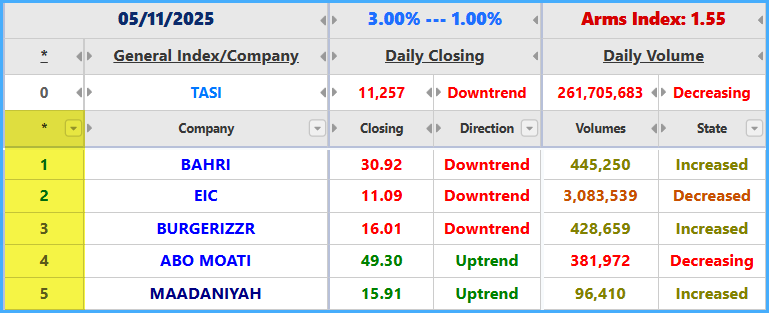
Preference is a serial number that ranks stocks/currency pairs according to rise strength and the positivity of technical indicators across all periods. This ranking depends on more than ten criteria for each stock/currency pair. Some criteria relate to the strength and results of the digital analysis of the different technical indicators for the stock/currency pair itself; others relate to the digital analysis results of the technical indicators for the rest of the stocks/currency pairs; others relate to the digital analysis results of the general index in stock-market versions; and others relate to previous historical-period analysis results.
Font colors indicate the following:
Light Green: the stock/currency pair belongs to the “Bullish Favorites” list.
Dark Green: the stock/currency pair belongs to the “Top Bullish” list.
Light Red: the stock/currency pair belongs to the “Bearish Favorites” list.
Dark Red: the stock/currency pair belongs to the “Top Bearish” list.
Gray: the stock/currency pair does not belong to any list.
Close
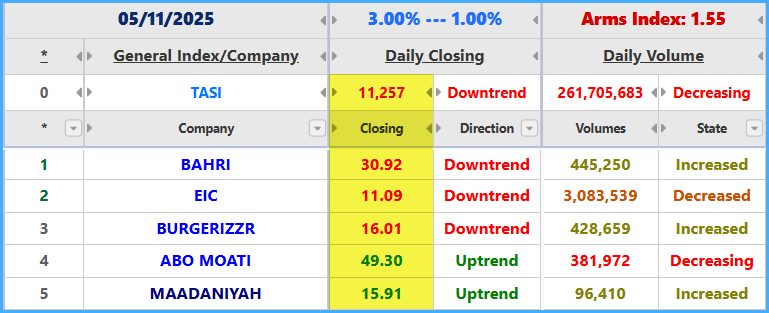
Olive: the close price rose compared with the previous day’s close.
Green: the close price is still rising compared with the previous two days’ closes.
Light Brown: the close price fell compared with the previous day’s close.
Red: the close price is still falling compared with the previous two days’ closes.
Black: the close price did not change compared with the previous day’s close.
Direction
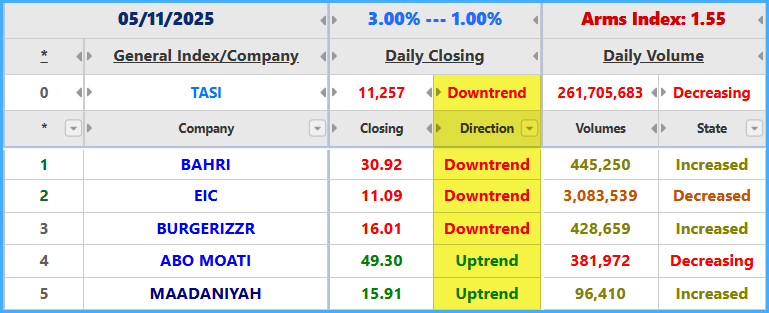
Shows the state of stocks/currency pairs and the general index according to the close-price direction compared with the previous two days.
Up: Olive / the close price rose compared with the previous day’s close.
Rising: Green / the close price is still rising compared with the previous two days’ closes.
Down: Light Brown / the close price fell compared with the previous day’s close.
Falling: Red / the close price is still falling compared with the previous two days’ closes.
Unchanged: Black / the close price did not change compared with the previous day’s close.
* The columns (Preference, Stock/Currency Names, Daily Close) are pinned in all versions of the program.
Volumes
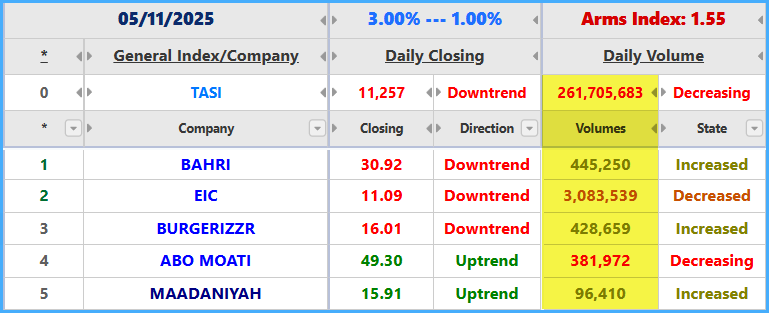
The color shows the volume state compared with the previous two days’ volumes.
* The Volumes field does not exist in Forex versions of the program.
Olive: volumes increased compared with the previous day’s volumes.
Green: volumes are still increasing compared with the previous two days’ volumes.
Light Brown: volumes decreased compared with the previous day’s volumes.
Red: volumes are still decreasing compared with the previous two days’ volumes.
Black: volumes did not change compared with the previous day’s volumes.
Volumes State
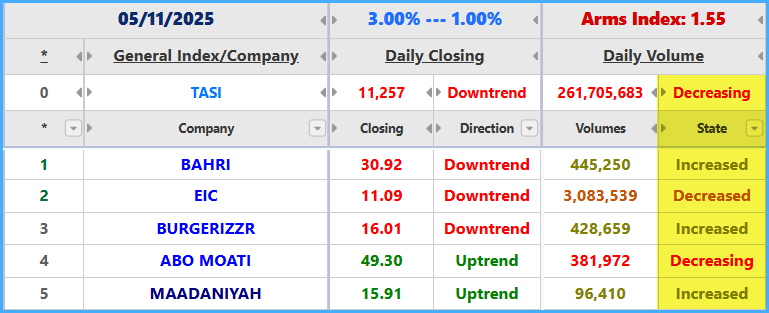
Shows the volume state compared with the previous two days’ volumes.
* The Volumes State field does not exist in Forex versions of the program.
Increased: Olive / volumes increased compared with the previous day’s volumes.
Increasing: Green / volumes are still increasing compared with the previous two days’ volumes.
Decreased: Light Brown / volumes decreased compared with the previous day’s volumes.
Decreasing: Red / volumes are still decreasing compared with the previous two days’ volumes.
Unchanged: Black / volumes did not change compared with the previous day’s volumes.
ARMS INDEX
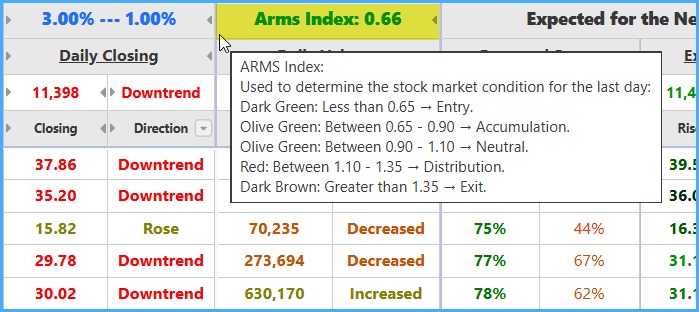
The ARMS INDEX helps significantly in identifying the market state for the last day.
* This indicator does not exist in Forex versions of the program.
Dark Green: less than 0.65 — Entry.
Olive: between 0.65 and 0.90 — Accumulation.
Olive: between 0.90 and 1.10 — Normal.
Red: between 1.10 and 1.35 — Distribution.
Dark Brown: greater than 1.35 — Exit.
Expected State for the Next Day
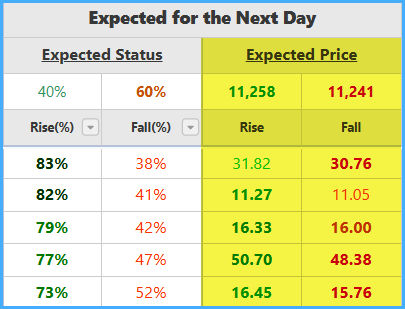
The expected state for the next day consists of percentages for expected rise and expected drop based on the digital analysis result of all effective technical indicators inferred by the program for the daily periods, merged with the overall analysis results for the weekly and monthly periods. Expected rise and expected drop are analyzed separately, and stocks/currency pairs are also compared with each other. For this reason, the rise and drop percentages vary, and their total does not necessarily equal 100%. These percentages refer to the expected direction of rise or drop, not the amount of price movement. Their strength and reliability depend heavily on their ranking in the list: the lower the rank number (the earlier the stock/currency pair appears in the ranking), the stronger and more reliable the result is.
Rise
Represents the expected rise percentage.
Dark Green: rise percentage is greater than 80%.
Green: rise percentage is greater than 70%.
Olive: rise percentage is greater than 60%.
Light Green: rise percentage is less than 60%.
Wide Light Green: rise percentage is greater than drop percentage.
Drop
Represents the expected drop percentage.
Maroon: drop percentage is greater than 80%.
Red: drop percentage is greater than 70%.
Light Brown: drop percentage is greater than 60%.
Orange: drop percentage is less than 60%.
Wide Orange: drop percentage is greater than rise percentage.
If the technical indicators result is incomplete, the value will be (–) in the rise and drop percentage cells.
Expected Price for the Next Day
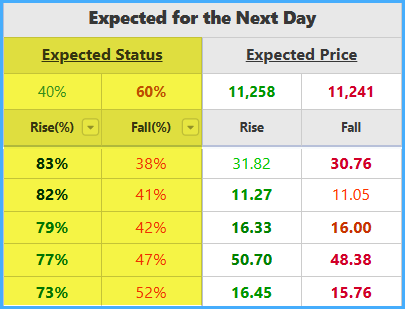
The expected price, upward or downward, is the price value closest to the targets (calculated, corrective, historical supports and resistances, Fibonacci correction levels, and EMA values) and is built on the average result of the professional numerical technical-indicator analysis.
Rise / expected price in case of rise:
The darker the color, the more reliable the expected price and the more difficult it is to exceed.
Wide Light Green: the expected rise price is easy to exceed, meaning it is an easy resistance.
Light Green: the expected rise price is easy to exceed, meaning it is an easier resistance.
Green: the expected rise price is difficult to exceed, meaning it is a more difficult resistance.
Dark Green: the expected rise price is difficult to exceed, meaning it is a strong resistance.
Drop / expected price in case of drop:
The darker the color, the more reliable the expected price and the more difficult it is to break.
Wide Orange: the expected drop price is easy to break, meaning it is an easy support.
Orange: the expected drop price is easy to break, meaning it is an easier support.
Red: the expected drop price is difficult to break, meaning it is a more difficult support.
Maroon: the expected drop price is difficult to break, meaning it is a strong support.
Expected Pips for the Next Day
Available only in Forex versions of the program.
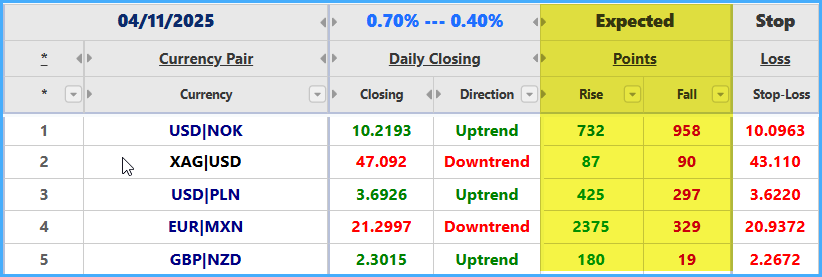
Expected pips for the next day, upward and downward, are the number of pips expected based on the expected prices.
Rise / expected number of pips in case of rise:
The darker the color, the more reliable the expected upward pips and the more difficult they are to exceed.
Wide Light Green: expected upward pips are easy to exceed.
Light Green: expected upward pips are easier to exceed.
Green: expected upward pips are difficult to exceed.
Dark Green: expected upward pips are more difficult to exceed.
Drop / expected number of pips in case of drop:
The darker the color, the more reliable the expected downward pips and the more difficult they are to exceed/break.
Wide Orange: expected downward pips are easy to exceed/break.
Orange: expected downward pips are easier to exceed/break.
Red: expected downward pips are difficult to exceed/break.
Maroon: expected downward pips are more difficult to exceed/break.
Targets
“Calculated, historical, corrective, EMA, and Fibonacci support and resistance points for the next day.”
This part contains the nine most important and strongest support points and the nine most important and strongest resistance points. These points are merged from calculated, historical, corrective, Fibonacci, and EMA levels in the program, and also include weekly and monthly support and resistance points. Red and brown gradients are used for supports in case of drop. Green gradients are used for resistances in case of rise. Darker shades represent stronger supports or resistances. In general, the darker the color, the stronger the support or resistance.

Allowed Intraday Fluctuation for the Next Day
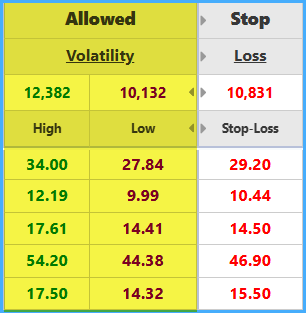
The allowed fluctuation for the next day represents the maximum possible price boundaries for the next day in case of rise and in case of drop.
* The “Allowed Fluctuation” field does not exist in some versions of the program.
Highest price: Green.
Lowest price: Purple.
Loss-Limit / Stop-Loss Prices
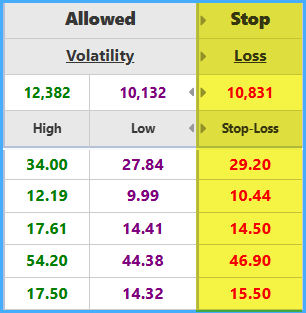
These are the strongest support prices during the trading period, inferred professionally by the program.
Technical Indicators Analysis Result for the Daily, Weekly, and Monthly Periods after the Last Daily Close
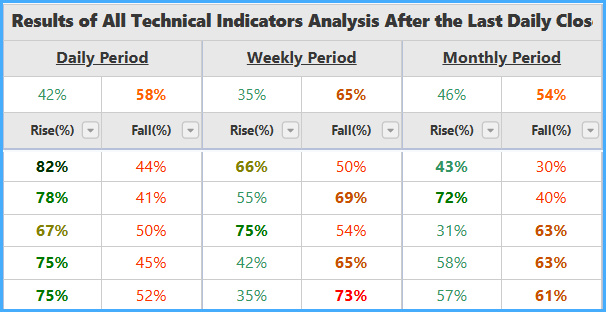
The technical indicators analysis result is the result of analyzing the effective technical indicators for each stock/currency pair from among the program’s indicators. It includes the effect of the general index and the effect of the rest of the stocks/currency pairs. In this analysis, technical-indicator rise and drop are analyzed separately, and stocks/currency pairs are also compared with one another. Therefore, the rise and drop percentages vary, and their sum does not necessarily equal 100%.
Rise
Represents the expected rise percentage.
Dark Green: rise percentage is greater than 80%.
Green: rise percentage is greater than 70%.
Olive: rise percentage is greater than 60%.
Light Green: rise percentage is less than 60%.
Wide Light Green: rise percentage is greater than drop percentage.
Drop
Represents the expected drop percentage.
Maroon: drop percentage is greater than 80%.
Red: drop percentage is greater than 70%.
Light Brown: drop percentage is greater than 60%.
Orange: drop percentage is less than 60%.
Wide Orange: drop percentage is greater than rise percentage.
If the result is incomplete, the value will be (–) in the rise and drop percentage cells.
Tomorrow’s Story Indicator Result for the Daily, Weekly, and Monthly Periods after the Last Daily Close
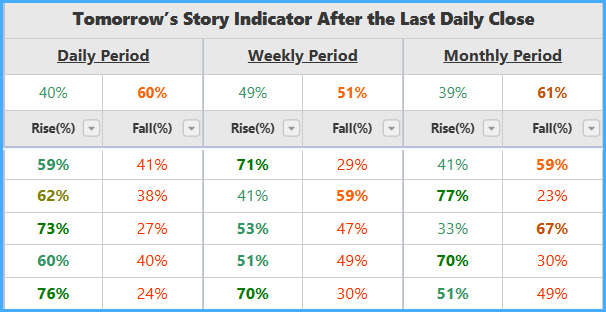
Tomorrow’s Story indicator is a distinctive new indicator that has proven highly reliable in confirming signals. It shows the expected rise and drop state based on the analysis of the trading behavior of only the latest period. It is very useful for confirming the expected rise or drop, but it should not be used alone without considering the rest of the indicators and other data.
Rise
Represents the expected rise percentage.
Dark Green: rise percentage is greater than 80%.
Green: rise percentage is greater than 70%.
Olive: rise percentage is greater than 60%.
Light Green: rise percentage is less than 60%.
Wide Light Green: rise percentage is greater than drop percentage.
Drop
Represents the expected drop percentage.
Maroon: drop percentage is greater than 80%.
Red: drop percentage is greater than 70%.
Light Brown: drop percentage is greater than 60%.
Orange: drop percentage is less than 60%.
Wide Orange: drop percentage is greater than rise percentage.
If the result is incomplete, the value will be (–) in the rise and drop percentage cells.
Candle-Close Indicator Result for the Daily, Weekly, and Monthly Periods after the Last Daily Close
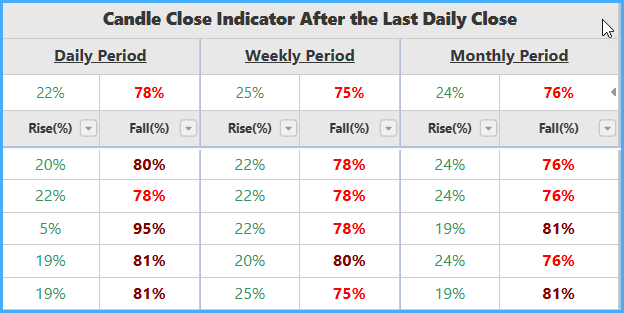
Candle-Close indicator is a distinctive new indicator that has proven highly reliable in confirming signals. It shows the expected rise and drop state based on a numerical technical analysis of the close and state of the latest candle and a historical comparison with previous candle closes and states. It is also very useful for confirming the expected rise or drop, but it should not be used alone without considering the rest of the indicators and other data.
Rise
Represents the expected rise percentage.
Dark Green: rise percentage is greater than 80%.
Green: rise percentage is greater than 70%.
Olive: rise percentage is greater than 60%.
Light Green: rise percentage is less than 60%.
Wide Light Green: rise percentage is greater than drop percentage.
Drop
Represents the expected drop percentage.
Maroon: drop percentage is greater than 80%.
Red: drop percentage is greater than 70%.
Light Brown: drop percentage is greater than 60%.
Orange: drop percentage is less than 60%.
Wide Orange: drop percentage is greater than rise percentage.
If the result is incomplete, the value will be (–) in the rise and drop percentage cells.
General Buy/Sell Zones Status for the Daily, Weekly, and Monthly Periods after the Last Daily Close
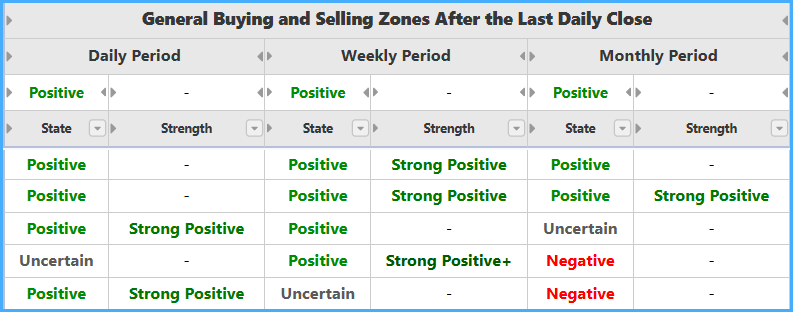
This shows whether Buy/Sell zones, when analyzed together in general, are positive, negative, or indecisive, and it shows the strength of positivity or negativity when present.
General state colors:
Green: positive state.
Red: negative state.
Gray: indecisive state.
Positivity/negativity strength colors:
Light green: Positive — indicates a Buy Zone.
Green: Strong Positive — indicates a breakout above a previous Sell Zone.
Dark green: Strong Positive+ — indicates a Buy Zone combined with a breakout above a previous Sell Zone.
Red: Negative — indicates a Sell Zone.
Brown: Strong Negative — indicates a breakdown below a previous Buy Zone.
Dark brown: Strong Negative+ — indicates a Sell Zone combined with a breakdown below a previous Buy Zone.
Last Buy or Sell Zone Status for the Daily, Weekly, and Monthly Periods after the Last Daily Close
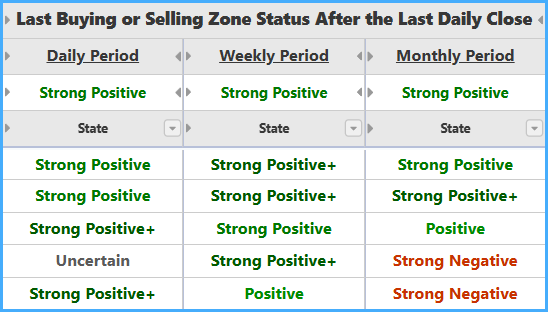
This shows the current zone state after the last daily close.
State colors:
Light Green: positive.
Green: strong positive.
Dark Green: strong positive+.
Red: negative.
Brown: strong negative.
Dark Brown: strong negative+.
Details of Buy/Sell Zones after the Last Daily Close
This section shows the important Buy/Sell zone details after the last daily close for the daily, weekly, and monthly periods.
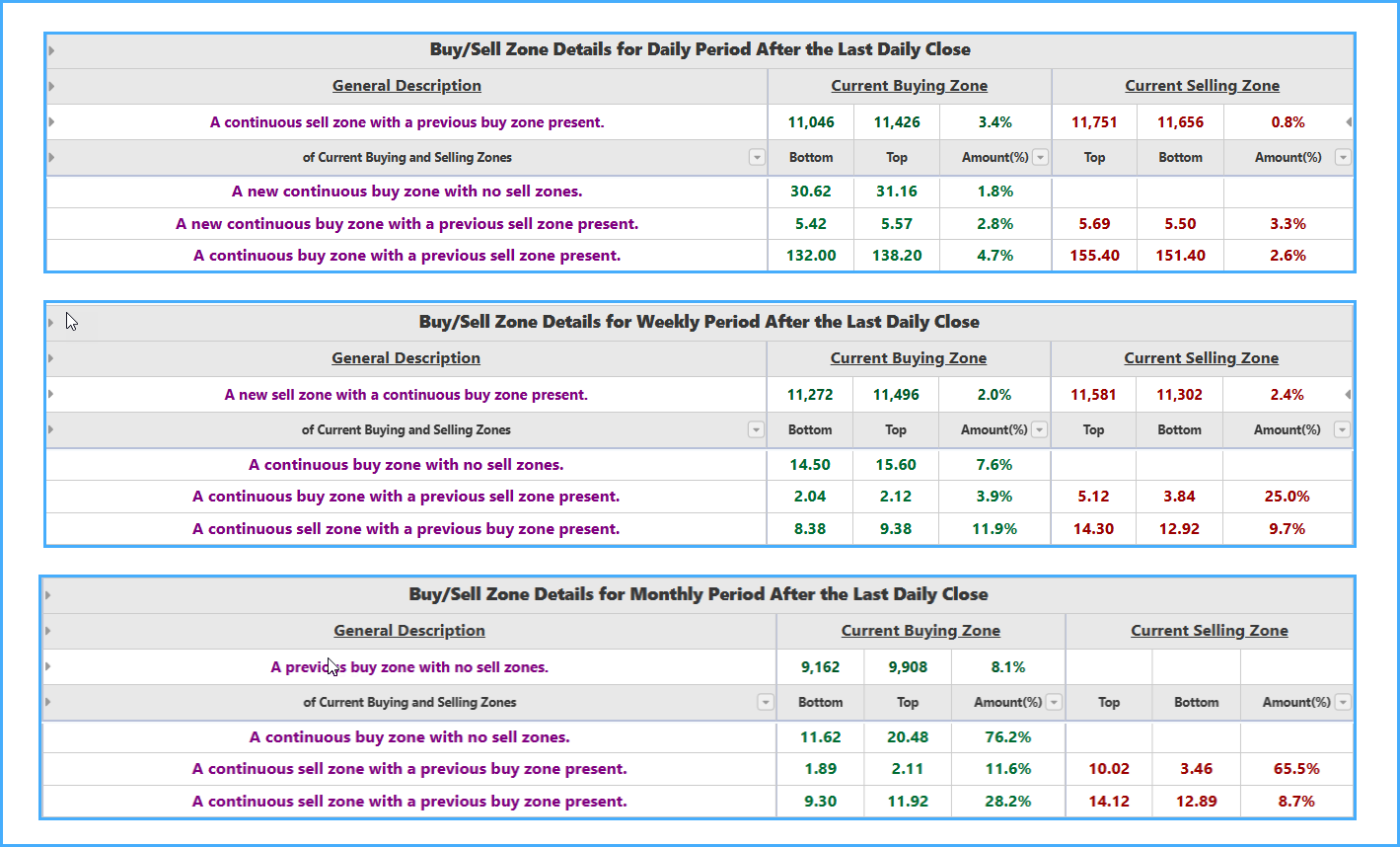
For each period, the details include a general description of the Buy and Sell zones, as well as the low, high, and magnitude of the current Buy and Sell zones.
The general description of Buy and Sell zones does not go beyond the following:
For each period, the details also include the total number of Buy zones and Sell zones after the last daily close.
Details of Technical Indicators Analysis Results and Buy/Sell Zones after Each Period Close
This section shows the results after the last weekly close for the weekly period and after the last monthly close for the monthly period. The daily period is also shown again in this section to make comparison with the other periods easier. It contains the following:
Technical Indicators Analysis Result for the Daily, Weekly, and Monthly Periods after Each Period Close
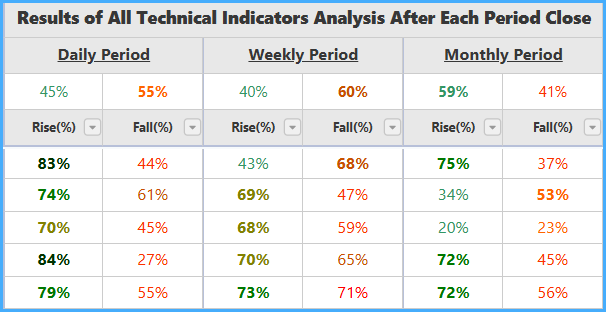
The technical indicators analysis result is the result of analyzing the effective technical indicators for each stock/currency pair from among the program’s indicators. It includes the effect of the general index and the effect of the rest of the stocks/currency pairs. In this analysis, technical-indicator rise and drop are analyzed separately, and stocks/currency pairs are also compared with one another. Therefore, the rise and drop percentages vary, and their sum does not necessarily equal 100%.
Rise
Represents the expected rise percentage.
Dark Green: rise percentage is greater than 80%.
Green: rise percentage is greater than 70%.
Olive: rise percentage is greater than 60%.
Light Green: rise percentage is less than 60%.
Wide Light Green: rise percentage is greater than drop percentage.
Drop
Represents the expected drop percentage.
Maroon: drop percentage is greater than 80%.
Red: drop percentage is greater than 70%.
Light Brown: drop percentage is greater than 60%.
Orange: drop percentage is less than 60%.
Wide Orange: drop percentage is greater than rise percentage.
If the result is incomplete, the value will be (–) in the rise and drop percentage cells.
Tomorrow’s Story Indicator Result for the Daily, Weekly, and Monthly Periods after Each Period Close
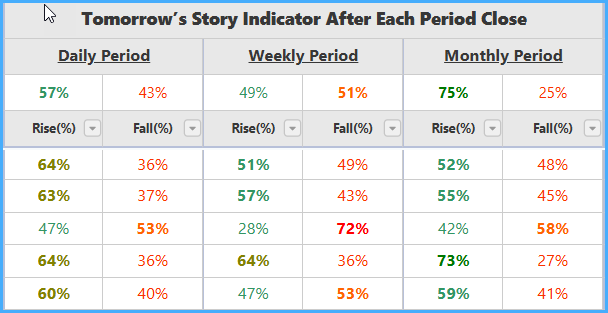
Tomorrow’s Story indicator is a distinctive new indicator that has proven highly reliable in confirming signals. It shows the expected rise and drop state based on the analysis of the trading behavior of only the latest period. It is very useful for confirming the expected rise or drop, but it should not be used alone without considering the rest of the indicators and other data.
Rise
Represents the expected rise percentage.
Dark Green: rise percentage is greater than 80%.
Green: rise percentage is greater than 70%.
Olive: rise percentage is greater than 60%.
Light Green: rise percentage is less than 60%.
Wide Light Green: rise percentage is greater than drop percentage.
Drop
Represents the expected drop percentage.
Maroon: drop percentage is greater than 80%.
Red: drop percentage is greater than 70%.
Light Brown: drop percentage is greater than 60%.
Orange: drop percentage is less than 60%.
Wide Orange: drop percentage is greater than rise percentage.
If the result is incomplete, the value will be (–) in the rise and drop percentage cells.
Candle-Close Indicator Result for the Daily, Weekly, and Monthly Periods after Each Period Close
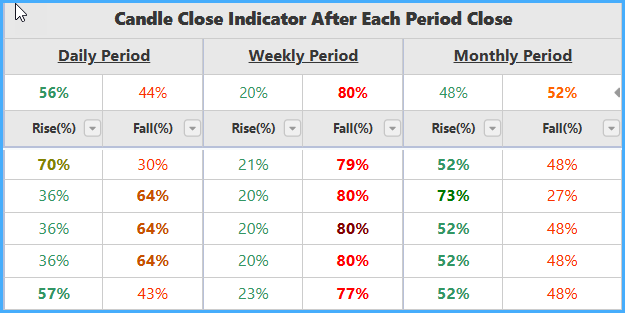
Candle-Close indicator is a distinctive new indicator that has proven highly reliable in confirming signals. It shows the expected rise and drop state based on a numerical technical analysis of the close and state of the latest candle and a historical comparison with previous candle closes and states. It is also very useful for confirming the expected rise or drop, but it should not be used alone without considering the rest of the indicators and other data.
Rise
Represents the expected rise percentage.
Dark Green: rise percentage is greater than 80%.
Green: rise percentage is greater than 70%.
Olive: rise percentage is greater than 60%.
Light Green: rise percentage is less than 60%.
Wide Light Green: rise percentage is greater than drop percentage.
Drop
Represents the expected drop percentage.
Maroon: drop percentage is greater than 80%.
Red: drop percentage is greater than 70%.
Light Brown: drop percentage is greater than 60%.
Orange: drop percentage is less than 60%.
Wide Orange: drop percentage is greater than rise percentage.
If the result is incomplete, the value will be (–) in the rise and drop percentage cells.
General Buy/Sell Zones Status for the Daily, Weekly, and Monthly Periods after Each Period Close
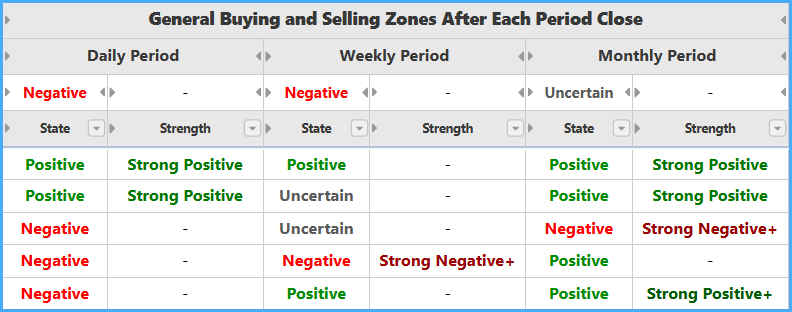
This shows whether Buy/Sell zones, when analyzed together in general, are positive, negative, or indecisive, and it shows the strength of positivity or negativity when present.
General state colors:
Green: positive state.
Red: negative state.
Gray: indecisive state.
Positivity/negativity strength colors:
Light green: Positive — indicates a Buy Zone.
Green: Strong Positive — indicates a breakout above a previous Sell Zone.
Dark green: Strong Positive+ — indicates a Buy Zone combined with a breakout above a previous Sell Zone.
Red: Negative — indicates a Sell Zone.
Brown: Strong Negative — indicates a breakdown below a previous Buy Zone.
Dark brown: Strong Negative+ — indicates a Sell Zone combined with a breakdown below a previous Buy Zone.
Last Buy or Sell Zone Status for the Daily, Weekly, and Monthly Periods after Each Period Close
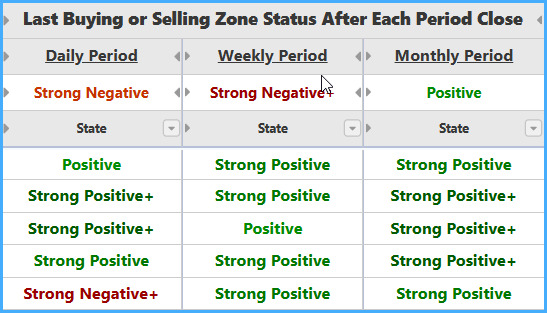
This shows the current zone state after the last close of each period.
State colors:
Light Green: positive.
Green: strong positive.
Dark Green: strong positive+.
Red: negative.
Brown: strong negative.
Dark Brown: strong negative+.
Details of Buy/Sell Zones after Each Period Close
This section shows the important Buy/Sell zone details after the last weekly close for the weekly period and after the last monthly close for the monthly period.
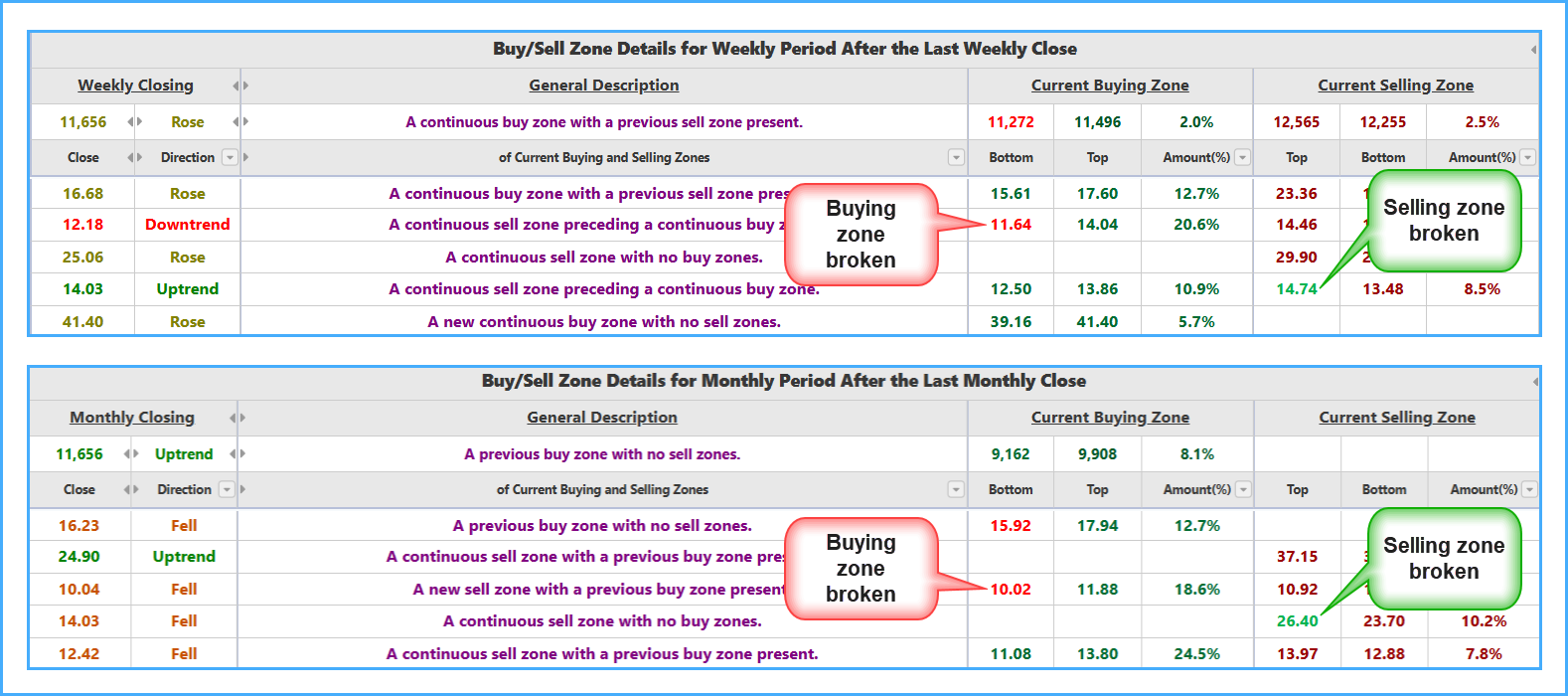
For the weekly and monthly periods, the details include the close price and state, a general description of the Buy and Sell zones, and the low, high, and magnitude of the current Buy and Sell zones.
Weekly/Monthly Close
Olive: the close price rose compared with the previous period’s close.
Green: the close price is still rising compared with the previous two periods’ closes.
Light Brown: the close price fell compared with the previous period’s close.
Red: the close price is still falling compared with the previous two periods’ closes.
Black: the close price did not change compared with the previous period’s close.
Direction
Shows the state of stocks/currency pairs and the general index according to the close-price direction compared with the previous two periods.
Up: Olive / the close price rose compared with the previous period’s close.
Rising: Green / the close price is still rising compared with the previous two periods’ closes.
Down: Light Brown / the close price fell compared with the previous period’s close.
Falling: Red / the close price is still falling compared with the previous two periods’ closes.
Unchanged: Black / the close price did not change compared with the previous period’s close.
The general description of Buy and Sell zones does not go beyond the following:
In the Current Buy/Sell Zone part for both periods, the font color becomes Red at the low of the Buy zone if it is broken after the last daily close, and Green at the high of the Sell zone if it is broken after the last daily close.
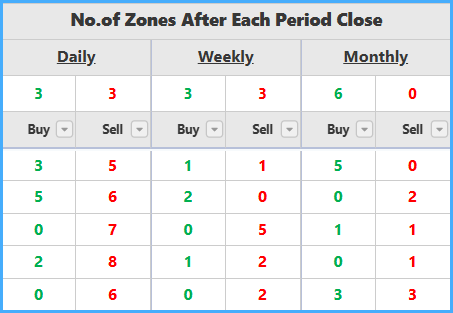
For each period, the details also include the total number of Buy zones and Sell zones after each period close.
Details of Technical Indicators Data
This section contains the program’s technical indicators data. It includes the value, direction, state, sell percentage, and buy percentage for each technical indicator from more than forty different technical indicators, for all stocks/currency pairs. The states and sell/buy percentages of these indicators are digitally inferred by the program during the daily update and analysis process. Colors play an important role in displaying this data in a way that is easy to understand at first glance, as follows:
Red and Brown: always indicate risky states and sell signals for each indicator’s values, directions, states, and sell/buy percentages.
Green and Olive: always indicate safe states and buy signals for each indicator’s values, directions, states, and sell/buy percentages.
Blue and Black: always indicate indecisive or ignored states for each indicator’s values, directions, states, and sell/buy percentages.
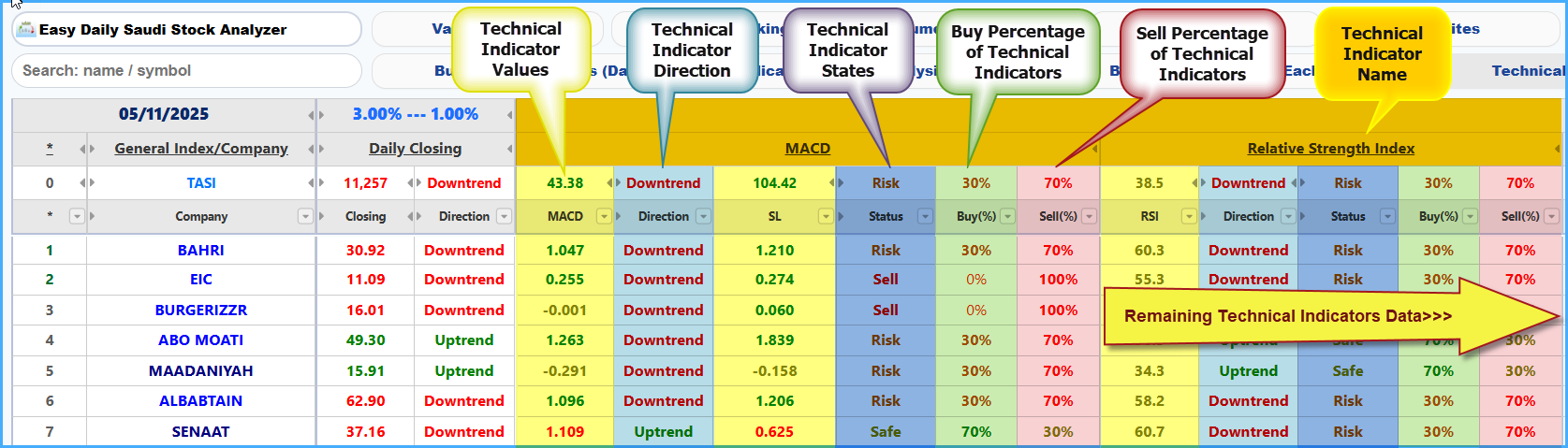
Technical Indicator Name
Shows the name of the technical indicator whose data is displayed below it.
Technical Indicator Value
Shows the value of the technical indicator.
Red: the indicator value is risky.
Green: the indicator value is safe.
Olive: the indicator value is indecisive.
Dark Blue: the indicator value is ineffective or ignored.
Technical Indicator Direction
Shows the indicator direction compared with the previous two days. The comparison is limited to one of the following states: Down, Up, Falling, Rising, or Unchanged. Colors express the direction state as follows:
Light Brown: the indicator direction is risky.
Olive: the indicator direction is safe.
Red: the indicator direction is risky-sell.
Green: the indicator direction is safe-buy.
Black: the indicator direction is flat / unchanged.
Technical Indicator State
Shows the indicator state based on its value and direction. The indicator state is limited to one of the following states: Risky, Sell, Safe, Buy, or Indecisive. Colors express the state as follows:
Light Brown: the indicator state is risky.
Olive: the indicator state is safe.
Red: the indicator state is risky-sell or indecisive.
Green: the indicator state is safe-buy.
Black: the indicator state is indecisive.
Sell and Buy Percentage
Shows the sell and buy percentage of the technical indicator based on its value, direction, and state. The colors of the sell/buy percentage values are as follows:
Light Brown: the percentage is risky.
Olive: the percentage is safe.
Red: the percentage is risky-sell.
Green: the percentage is safe-buy.
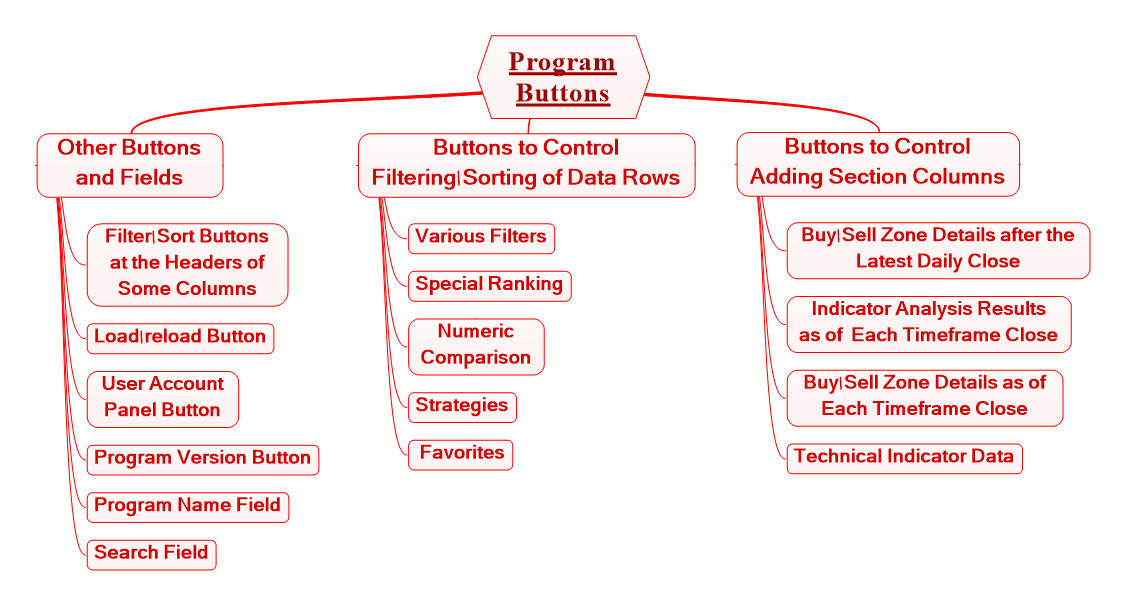
Program Buttons & Icons (Detailed)
The program’s main buttons and icons are always fixed at the top of the program screen above the data column-header rows for easy access and control. There are also other filtering and sorting buttons at some column headers and additional fields.
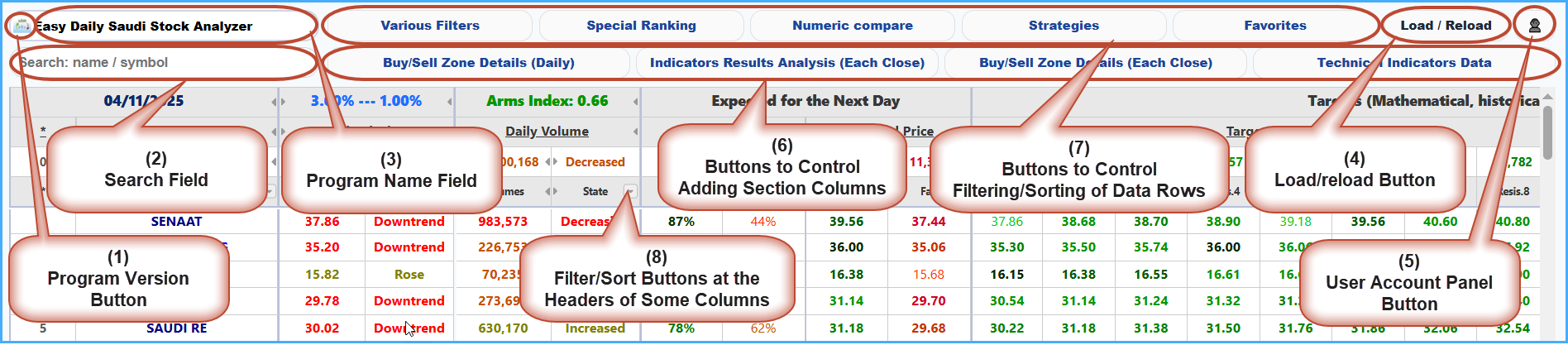
(1) Show Current Program Version Button
(2) Search Box
Used to search for a stock/currency pair by name or symbol.
(3) Program/Market Name Field
(4) Reload and Re-initialize Button
Used to reload and reformat the data without logging out and logging in again.
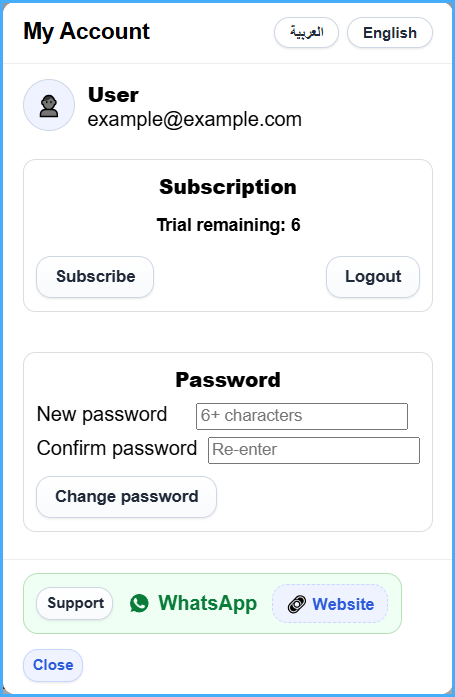
(5) Show User Window Button
(6) Group of Buttons for Showing/Hiding Program Section Columns
These are four buttons as follows:
When one of the show/hide section buttons is pressed, the button color changes to indicate that the section has been displayed.
(7) Group of Buttons for Filtering and Sorting Data Rows
These are five buttons as follows:
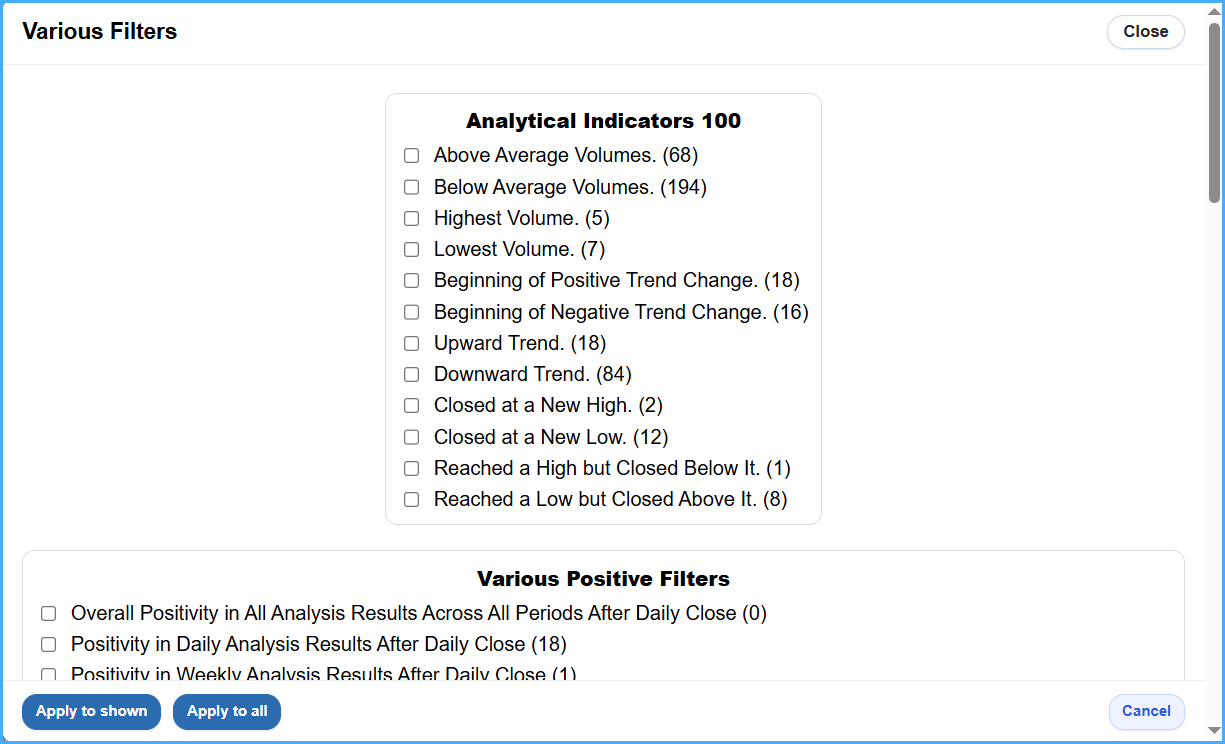
Various Filters Button
This button shows the Various Filters window. It can run the selected filter on the currently displayed stocks/currency pairs or on all stocks/currency pairs after choosing from four pre-prepared filter lists. These filters were carefully selected to simplify filtering operations and are very useful for saving time and effort. Next to each option, the number of matching stocks/currency pairs is shown. The number of filters may increase or decrease depending on the program/market. The lists are as follows:
100 Trading-Day Chart Indicators List
This list contains diverse and unique filtering options for stocks/currency pairs over only the last 100 trading days, as follows:
* (xxx) indicates the number of stocks/currency pairs matching the filter.
Various Positive Filters List
This list contains diverse and unique options for filtering positive stocks/currency pairs, as follows:
* (xxx) indicates the number of stocks/currency pairs matching the filter.
Various Negative Filters List
This list contains diverse and unique options for filtering negative stocks/currency pairs, as follows:
* (xxx) indicates the number of stocks/currency pairs matching the filter.
Other Various Filters List
This list contains diverse and unique options for filtering stocks/currency pairs, as follows:
* (xxx) indicates the number of stocks/currency pairs matching the filter.
* More filters will be added automatically once their usefulness is proven.
Special Ranking Button
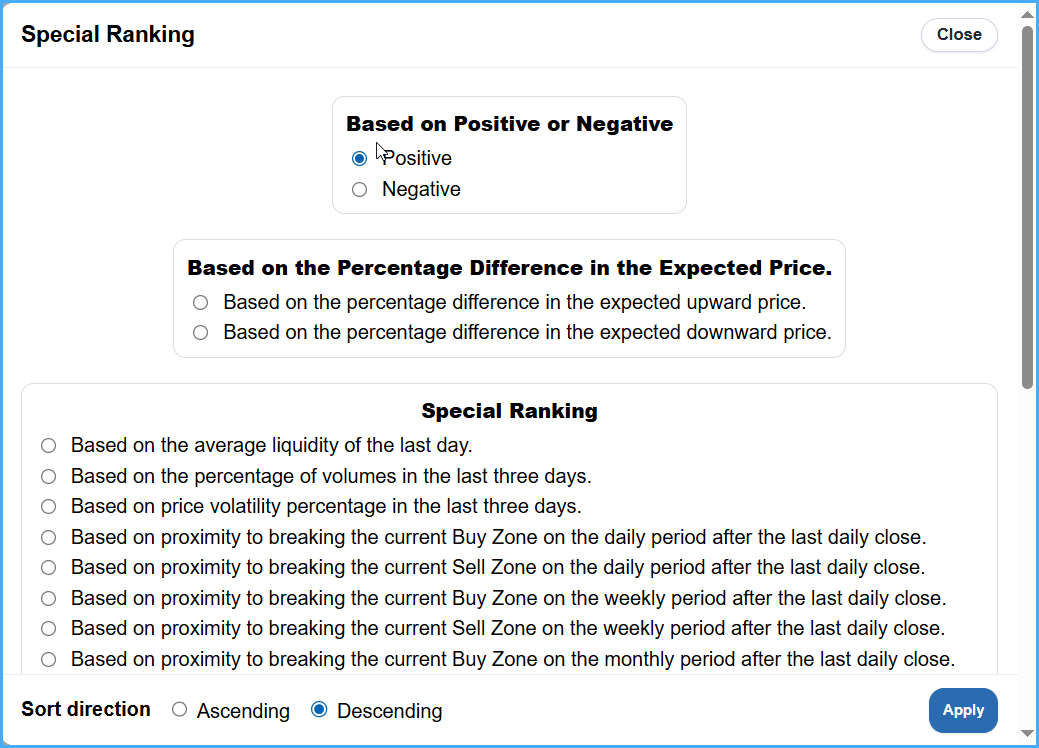
This button shows the Special Ranking window. It provides wide, useful, and simplified options for ranking stocks/currency pairs using all parts and data of the program in ways that cannot be done from the visible program data alone. Ranking can be performed ascending or descending for options under three main lists as follows:
Rank by Positivity or Negativity
Positive:
Ranks all companies/currency pairs by positivity, so they appear ordered according to more than ten criteria, including the strength of the expected rise and the positivity of the numerical technical analysis results for the company/pair itself, for the other companies/pairs, for the general index in stock market versions, for historical periods, and for all periods.
Negative:
Ranks all companies/currency pairs by negativity, so they appear ordered according to more than ten criteria, including the strength of the expected drop and the negativity of the numerical technical analysis results for the company/pair itself, for the other companies/pairs, for the general index in stock market versions, for historical periods, and for all periods.
Rank by Percentage Difference in the Expected Price
Custom Ranking
* More ranking options will be added automatically once their usefulness is proven.
Numeric Compare Button
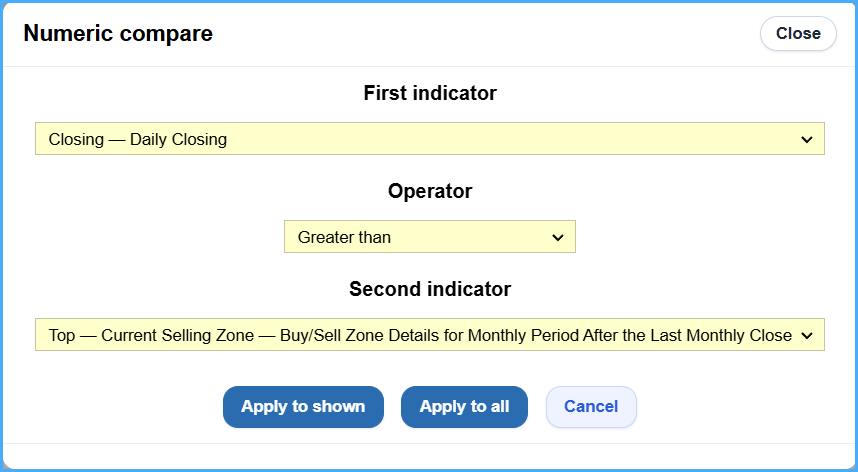
This button shows the Numeric Compare window, which allows comparisons between comparable numeric values among the numeric columns in all program data. The comparable values include the following:
Strategies Button
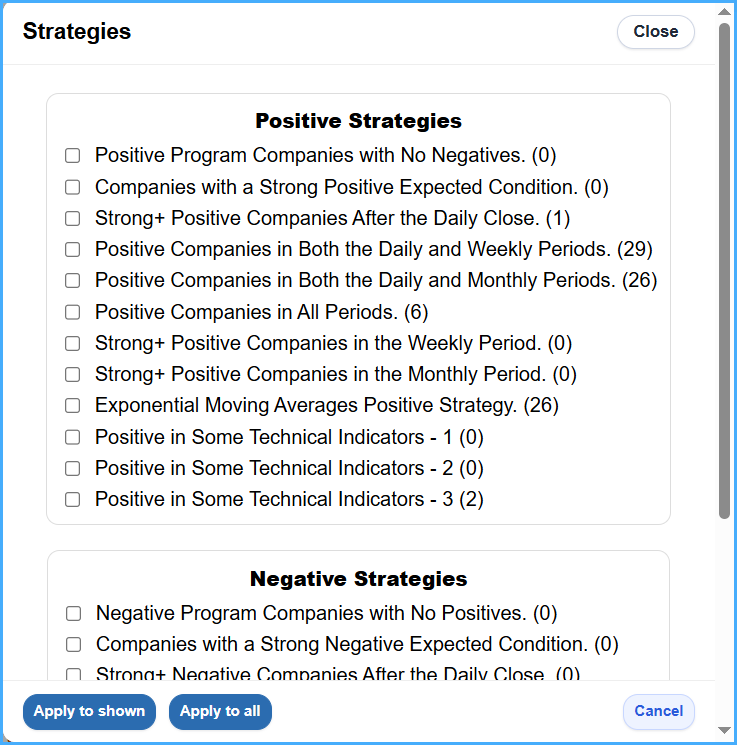
This button shows the Strategies window. It runs filtering for strategies that are satisfied among the displayed stocks/currency pairs, or runs them on all after choosing from the Positive Strategies or Negative Strategies lists. These strategies have been prepared very carefully and are effective and successful in filtering stocks/currency pairs from the program data. When a strategy is selected, a short description of the selected strategy appears at the bottom of the window. Next to each strategy, the number of matching stocks/currency pairs is shown. The number of strategies may increase or decrease depending on the program/market, as follows:
Positive Strategies
Negative Strategies
* (xxx) indicates the number of stocks/currency pairs matching the filter.
* More strategies will be added automatically after their success and effectiveness are verified.
Favorites Button
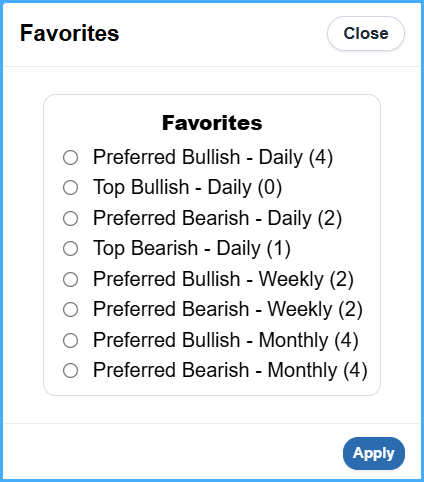
This button shows the Favorites window. It displays lists of positive stocks/currency pairs that are more qualified to rise, or negative stocks/currency pairs that are more qualified to drop, where certain technical conditions have been met that make them more qualified to rise/drop than other stocks/currency pairs. Next to each option in this window, the number of matching stocks/currency pairs is shown. These currently include:
* (xxx) indicates the number of matching stocks/currency pairs.
* More Favorites will be added automatically once their effectiveness is proven and verified.
(8) Filtering and Sorting Buttons at Some Column Headers
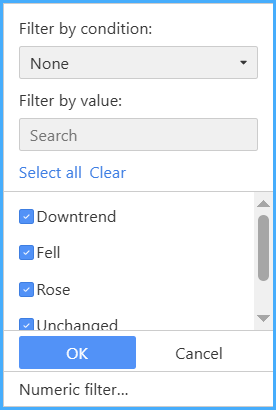
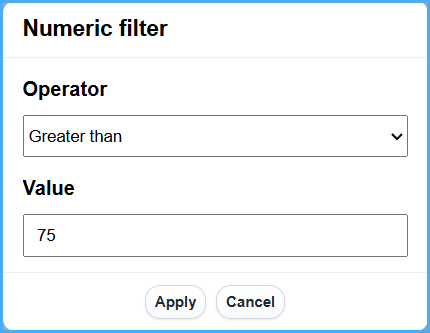
These buttons open a special window for each column so filtering can be applied to that column only. They are placed in the headers of data columns that support filtering operations. A small button was also added at the bottom of each window to perform numeric filtering for that column.
General Index Data Is Always in the First Row
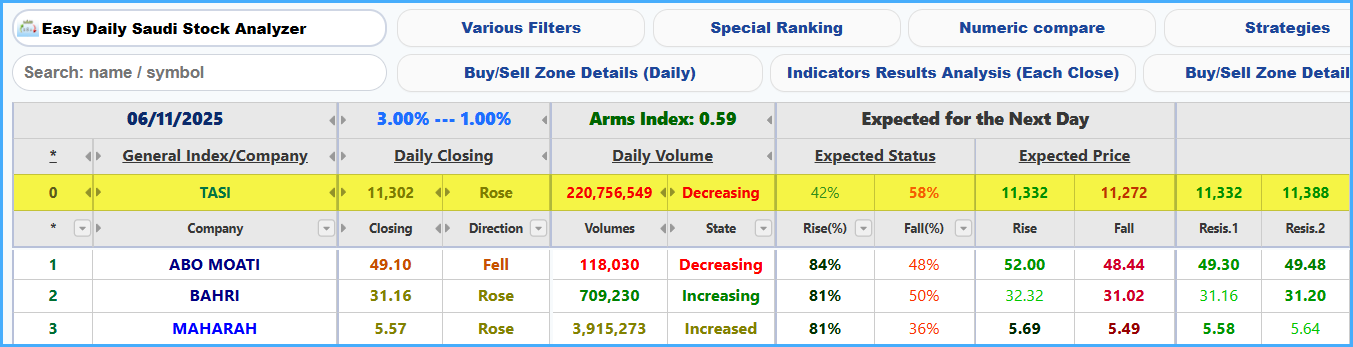
General index data and indicators are always in the first row of the data.
* The General Index row does not exist in Forex versions of the program.
Comments on Program Column Headers
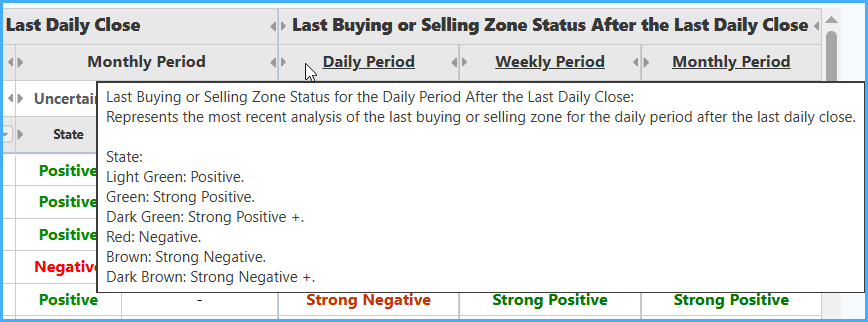
Explanatory comments appear for most program columns when the mouse pointer is moved over each column header in the program.